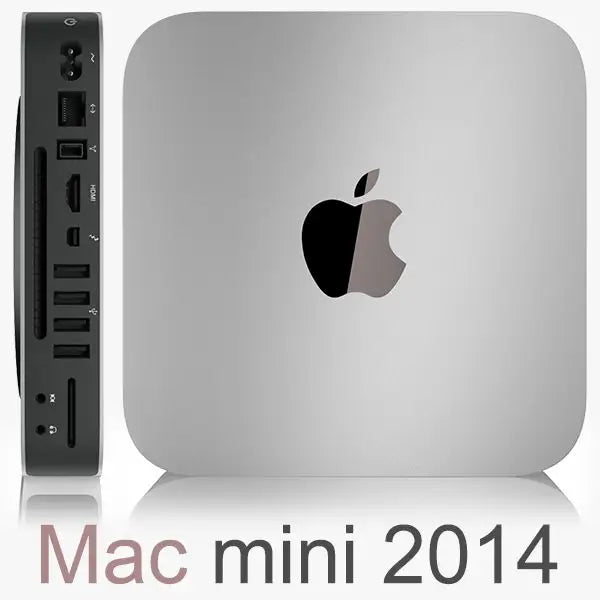
The Apple Mac mini 7,1, also known as the Mac mini Late 2014, is a compact desktop computer that still makes great sense today for users who want a quality, quiet, and energy-efficient computer with the macOS operating system. Thanks to its aluminum body, small dimensions, and low power consumption, it is perfectly suited for the office, home, school, reception, business premises, or as a multimedia computer for a monitor or TV.

Unlike many cheap plastic mini PCs, the Mac mini offers honest craftsmanship, an elegant design, and the macOS environment, which is popular for its simplicity, stability, and comfortable everyday work. If you are looking for an affordable entry into the world of Apple, a refurbished Mac mini 7,1 is a very interesting choice.
View current offers for Apple Mac mini 7,1 2014 at NewLifeMac.cz
Mac mini 7,1 with Intel Core i5 / i7 Haswell 4th generation processors
The Mac mini 7,1 was equipped with Intel Core i5 and Intel Core i7 fourth-generation Haswell processors. These are energy-efficient dual-core processors with four threads, suitable mainly for everyday tasks: internet, emails, documents, accounting, administration, multimedia, or photo editing within reasonable limits.
Available Processor Configurations
| Processor | Frequency | Suitable Use |
|---|---|---|
| Intel Core i5-4260U | 1.4 GHz, Turbo Boost up to 2.7 GHz | Basic office, internet, email, home use |
| Intel Core i5-4278U | 2.6 GHz, Turbo Boost up to 3.1 GHz | Balanced option for everyday work |
| Intel Core i5-4308U | 2.8 GHz, Turbo Boost up to 3.3 GHz | Faster option for multitasking and more demanding use |
| Intel Core i7-4578U | 3.0 GHz, Turbo Boost up to 3.5 GHz | Most powerful configuration of this Mac mini series |
For common use, we mainly recommend variants with the Intel Core i5-4278U, Intel Core i5-4308U, or Intel Core i7-4578U processor. The basic i5-4260U is suitable for simpler tasks, but for more demanding use, it is better to opt for a higher configuration.
RAM Configuration – 4 GB, 8 GB or 16 GB
The Apple Mac mini 7,1 can be available in several memory configurations. RAM is integrated on the motherboard in this model, so it is important to choose the correct variant when purchasing.
- 4 GB RAM – basic variant for simple use, internet, email, and documents.
- 8 GB RAM – recommended configuration for standard office, home use, and more comfortable multitasking.
- 16 GB RAM – the best choice for more demanding users, multiple applications simultaneously, and longer device lifespan.
If you want to use the Mac mini every day, we ideally recommend 8 GB RAM or 16 GB RAM. The 16 GB variant is most interesting for customers who want the maximum from this generation.
Storage Configuration – HDD, SSD, Fusion Drive, or M.2 modification
The biggest difference in real-world speed often comes not from the processor itself, but from the type of storage. A Mac mini with a classic HDD is suitable for cheaper use and larger capacity, but the SSD variant is significantly faster for system startup, opening applications, and general work.
- HDD 500 GB – basic capacity for common data and documents.
- HDD 1 TB – suitable for users who want more space for files, photos, and archives.
- SSD 128 GB – fast system startup and quick response, suitable for basic work and cloud.
- SSD 256 GB – a very good compromise of speed and capacity for general use.
- SSD 512 GB – comfortable fast option with more space.
- Fusion Drive 1 TB / 2 TB – a combination of a faster SSD part and a larger capacity classic hard drive.
- M.2 / SSD modification according to specific configuration – some units may be equipped with a more modern or service-modified SSD solution.
For the best user experience, we recommend choosing a configuration with an SSD drive. Even an older Mac mini with an SSD feels significantly faster in everyday use than a variant with a classic HDD.
Choose Mac mini 7,1 configuration by RAM, processor, and storage
How does the Mac mini 7,1 compare to today's common computers?
It's important to state openly: the Mac mini 7,1 is not a performance competitor to new powerful computers. New cheap mini PCs with Intel N100, N150, or i3-N305 processors often have higher raw multi-core performance results. This means that for demanding calculations, video editing, modern games, or heavy multitasking, a newer computer will be more powerful.
However, where the Mac mini still makes sense is for everyday tasks. For internet, emails, office documents, invoicing, accounting, remote administration, video playback, or simple home and business work, the Mac mini 7,1 is still usable – especially in the variant with 8 GB or 16 GB RAM and an SSD drive.
| Device / Processor | Approximate CPU Performance | Practical Assessment |
|---|---|---|
| Mac mini 7,1 – Intel Core i5-4260U | Basic performance | Suitable for simple office and home use |
| Mac mini 7,1 – Intel Core i5-4278U / i5-4308U | Better performance within this generation | Good choice for everyday work, especially with SSD |
| Mac mini 7,1 – Intel Core i7-4578U | Best Mac mini 2014 performance | Most interesting configuration for more demanding common use |
| New mini PC with Intel N100 / N150 | Higher multi-core performance | Often faster CPU, but usually without macOS and with cheaper construction |
| New mini PC with Intel Core i3-N305 | Significantly higher CPU performance | Better for more demanding work, but usually more expensive and without the Apple environment |
Why choose a refurbished Mac mini instead of a cheap new PC?
A new cheap mini-computer may have higher benchmark performance, but the Mac mini offers other advantages: quality aluminum construction, quiet operation, simple design, the macOS environment, and excellent usability for everyday work. For many customers, the maximum test performance is not the decisive factor, but rather pleasant use, reliability, small dimensions, and a good price-performance ratio.
- macOS at an affordable price – suitable for Apple ecosystem users.
- Compact dimensions – fits on any desk or next to a monitor.
- Quiet and energy-efficient operation – ideal for office or home.
- Quality aluminum body – better impression than many cheap plastic mini PCs.
- Ecological choice – a refurbished computer extends the life of quality electronics.
- Affordable price – lower acquisition costs than a new Mac.
Who do we recommend the Mac mini 7,1 to?
- Users who want an affordable entry into the world of macOS.
- For office use for emails, documents, accounting, and administration.
- For home use for internet, movies, music, and general use.
- For schools, receptions, businesses, and small companies.
- As a small computer for a monitor or television.
- For customers who prefer refurbished and more ecological electronics.
When is it better to choose a newer computer?
If you plan to edit 4K video, play modern games, use demanding graphic applications, work with large data, or want the latest macOS versions for many years to come, we recommend considering a newer Mac with an Apple Silicon chip or a more powerful modern computer. The Mac mini 7,1 is primarily a practical and affordable work computer, not a replacement for a modern, high-performance workstation.

Recommended configurations by use
| Use | Recommended Configuration |
|---|---|
| Basic home use | Intel Core i5, 4–8 GB RAM, SSD 128–256 GB |
| Office and everyday work | Intel Core i5-4278U / i5-4308U, 8 GB RAM, SSD 256 GB |
| Faster multitasking | Intel Core i5 / i7, 16 GB RAM, SSD 256–512 GB |
| Larger storage for data | HDD 1 TB, Fusion Drive 1 TB / 2 TB or SSD 512 GB as needed |
Summary: a small Mac that still has its place
The Apple Mac mini 7,1 2014 is no longer the newest computer, and in raw performance, today's cheap mini PCs often surpass it. Nevertheless, it remains a very interesting choice for anyone looking for an affordable, quiet, compact, and well-built computer with macOS.
The best choices are configurations with 8 GB or 16 GB RAM and ideally with an SSD drive. Such a setup will offer pleasant system responsiveness and comfortable use for common office, home, and business tasks.
Share:
I rent servers and PCs with a viewing window for each rental period
Refurbished server SAS drives: 600GB and 900GB HDDs for Dell, HPE and Lenovo