
Table of Contents
Overview
In this article, you will learn about the importance of network adapters for efficient connectivity in homes and businesses. We introduce several high-performance models, such as Dell HY7RM and X-540-T2, and provide tips on choosing the right adapter for your needs.
In today's world, where stable internet connectivity is essential for every business and home, network adapters play a crucial role in ensuring reliable connectivity. Whether it's refurbished servers, workstations, or devices like a refurbished iMac, choosing the right adapter can significantly impact your network's performance. In this article, we'll look at some of the best network adapters available on the market and how they can support your infrastructure.
Introduction to Network Adapters
Network adapters are devices that allow computers and other devices to connect to a network. Regardless of whether you use service servers like the DELL R640, or workstations, such as the Dell T7810, the right network adapter is essential for ensuring a fast and secure connection. In this article, we will introduce several high-performance network adapters that combine reliability, speed, and suitability for both common and demanding applications.
Top Network Adapters for Your Network
Let's look at some selected network adapters that can strengthen your network infrastructure:
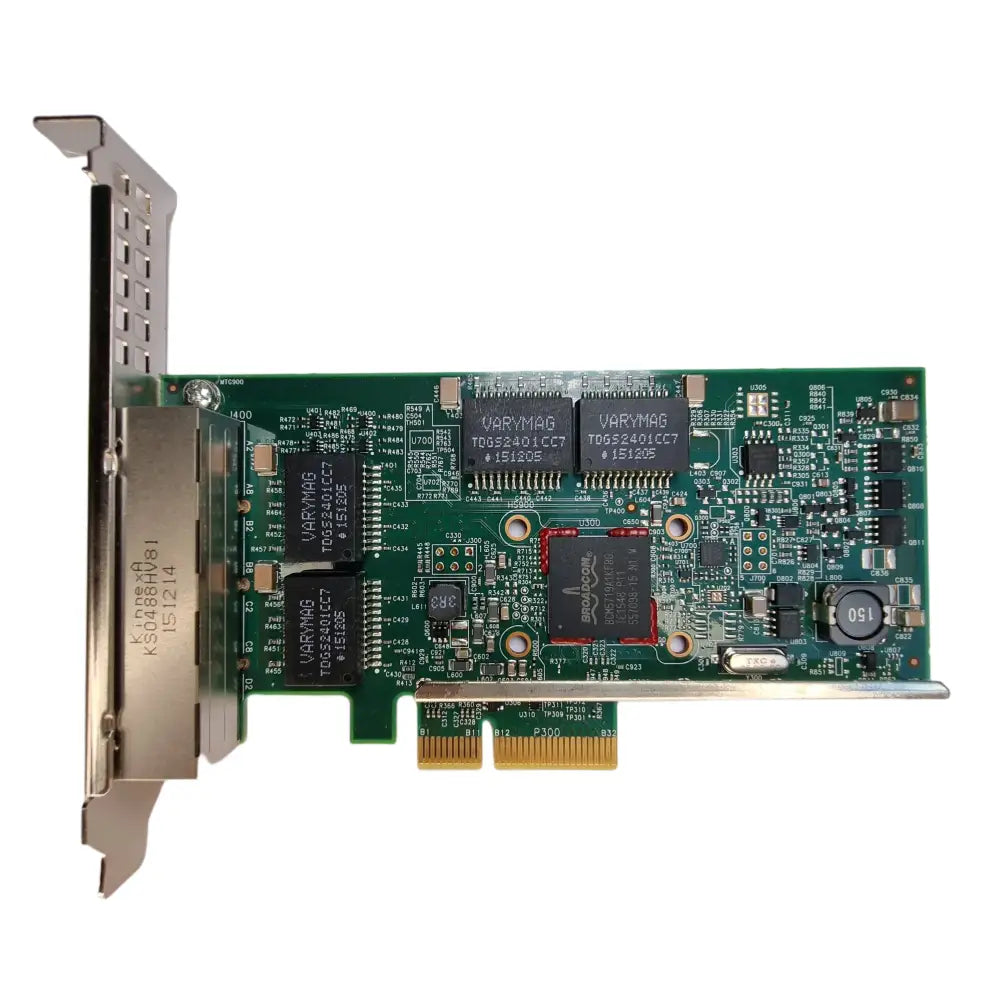
1. Dell HY7RM, BCM5719, 1Gb Network Adapter

This network adapter, also known as 0HY7RM, features the Broadcom BCM5719 chip and offers four gigabit Ethernet ports. It is an ideal choice for Dell PowerEdge servers that require increased capacity and reliability. Thanks to its ability to support speeds of up to 1 Gbps on each port, it is suitable for environments where higher bandwidth is required.
2. Dell X-540-T2 Dell K7H46 Network Adapter

The Dell K7H46 adapter, known as X540-T2, offers dual 10GbE support through two RJ-45 ports. It is designed for servers and network-intensive applications, making it an excellent choice for businesses that require high-speed connectivity. This adapter is ideal for environments where high data throughput and low latency are important.
3. ADLINK PCIe-PoE4 / PoE4+ Network Adapter

The ADLINK PCIe-PoE4 adapter is an excellent choice for Power over Ethernet (PoE) applications, meaning it can power devices like cameras or other network devices directly via an Ethernet cable. This feature is useful in many industrial and commercial applications where maintaining a simple and efficient installation is important.
4. Dell T34F4, I350-T4, 1Gb Network Adapter

This network adapter with an Intel I350-T4 chipset offers four RJ-45 ports with a maximum speed of 1 Gbps. It is compatible with various operating systems and supports auto-negotiation, which facilitates its deployment in different types of networks. Its low profile makes it ideal for servers where space saving is required.
How to Choose the Right Network Adapter
When choosing a network adapter, it is important to consider several factors:
- Speed requirements: Consider what connection speed is necessary for your applications - whether you need 1GbE, 10GbE, or PoE.
- Interface type: Make sure the adapter has the correct interface (e.g., PCIe) that is compatible with your hardware.
- Number of ports: Determine how many ports you need for your devices and which combination is most suitable for you.
- Compatibility: Check if the adapter is compatible with your operating system and other components.
- Purpose of use: Consider whether you plan to use the adapter in demanding applications or for routine office tasks.
Conclusion
Choosing the right network adapter is crucial for ensuring efficient and reliable connectivity in your network. Whether you opt for a Dell HY7RM or Dell X-540-T2, or another model, it is important to keep the specific needs of your infrastructure in mind. With this information, you should be better equipped to select the ideal adapter to support your refurbished servers or workstations.
Key Takeaways
- Network adapters are crucial for reliable connectivity - They ensure the connection of computers and devices to the network.
- The correct adapter choice impacts network performance - An adapter can improve connection speed and reliability.
- Dell HY7RM is ideal for PowerEdge servers - It offers four gigabit ports and high bandwidth.
- Dell X-540-T2 is suitable for demanding applications - Provides dual 10GbE support for high-speed connectivity.
- ADLINK PCIe-PoE4 powers devices over Ethernet - Allows for simple installation for cameras and network devices.
- Dell T34F4 offers four gigabit ports - It is compatible with various operating systems and saves space.
- When choosing an adapter, consider speed and compatibility - It is important to adapt the adapter to the specific needs of your network.
Pros and Cons
| Pros | Cons |
|---|---|
| High connection speed (1GbE, 10GbE) | Higher price for advanced models |
| Ability to power devices over Ethernet (PoE) | Compatibility with some older systems may be limited |
| Flexibility due to multiple ports for device connection | Installation may require professional assistance |
| Support for various operating systems | Possible issues with the availability of specific models |
| Easy deployment and auto-negotiation | Need to consider specific performance requirements |
Quick Comparison
| Option | Best for | Strengths | Business Benefits |
|---|---|---|---|
| Dell HY7RM, BCM5719, 1Gb Network Adapter | Dell PowerEdge Servers | Four gigabit Ethernet ports, high reliability | Higher bandwidth, ideal for demanding applications |
| Dell X-540-T2 Dell K7H46 Network Adapter | Businesses with demanding applications | 10GbE support, low latency | High data throughput, ideal for servers |
| ADLINK PCIe-PoE4 / PoE4+ Network Adapter | Power over Ethernet (PoE) applications | Powering devices over Ethernet, simple installation | Efficient for industrial applications, space-saving |
| Dell T34F4, I350-T4, 1Gb Network Adapter | Flexible connectivity for servers | Four RJ-45 ports, compatibility with various OS | Easy deployment, space-saving due to low profile |
Frequently Asked Questions
1. What are network adapters?
2. How to choose the right network adapter?
3. What are the top network adapters for my network?
4. What is Power over Ethernet (PoE)?
5. What factors influence the choice of a network adapter?
Glossary
| Term | Meaning |
|---|---|
| Network Adapter | A device for connecting to a network. |
| Ethernet | Technology for a local area network (LAN). |
| PoE | Powering devices over an Ethernet cable. |
| RJ-45 | Standard connector for network cables. |
| Gbps | Gigabits per second, a measure of connection speed. |
| Auto-negotiation | Automatic adjustment of connection speed and duplex. |
| PCIe | Interface for connecting to the motherboard. |
| Servers | Powerful computers providing services on a network. |
| Latency | Time delay in data transmission. |
| Throughput | The amount of data that can be transmitted per unit of time. |
Share:
Maintenance and Servicing of Refurbished Servers: Everything You Need
Ecological benefits of buying refurbished workstations